Taurine Vs Unc0ver Jailbreak

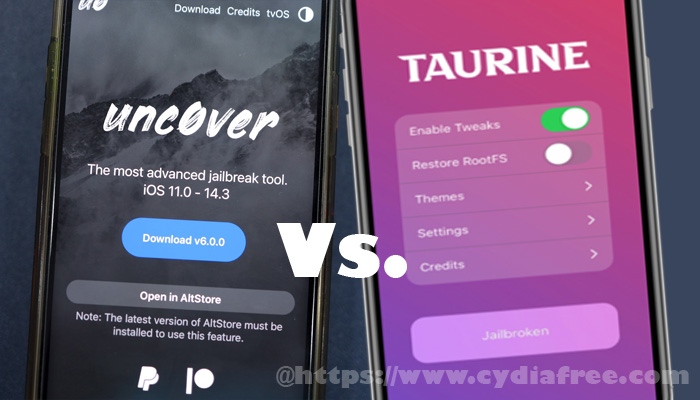
Taurine iOS 14 is the most popular jailbreak app these days because it is the latest released jailbreak app for public use. It is a semi-untethered jailbreak app that is very much similar to the famous Unc0ver jailbreak app. Therefore, many people have started comparing Taurine and Unc0ver jailbreak apps to decide which is the best one. In this article, we intend to compare Taurine Vs Unc0ver jailbreak apps.
Taurine Vs Unc0ver – Introduction

The famous jailbreak developer CoolStar and his team released the Taurine jailbreak app recently, adding compatibility to iOS 14 – 14.3. It was developed by using the famous cicuta_verosa kernel exploit for iOS/ iPadOS 14.0 – 14.3 that was released by @ModernPwner. The same exploit was used to build the Unc0ver 6.0 latest version as well. Therefore, Taurine and Unc0ver 6.0 both support iOS 14 – 14.3 devices to proceed with iOS jailbreaking.

Unc0ver was the first jailbreak that was released for all iOS 14 – 14.3 jailbreak without any limitation. Then CoolStar released Taurine iOS 14 with the same compatibility range. Both these jailbreak apps have similarities like their compatibility and the jailbreak method (semi-untethered) they use. However, more than that, we can note some important differences between Taurine and Unc0ver jailbreak apps. They will help you to choose between these two jailbreak apps.

Taurine Vs Unc0ver – What is Better?

Speaking of the truth, Taurine iOS 14 delivers some key aspects that makes it worth trying for any jailbreak lover. Indeed, both Unc0ver and Taurine apps are compatible with the same set of devices, including the latest iPhone 11 series and iPhone 12 series. The key difference you can note between them is that Taurine installs Sileo and the Unc0ver installers Cydia as the package manager.

Sileo Vs Cydia

Saurik has stopped updating Cydia so that it is no longer active, and there are many issues with the Cydia package manager. Cydia was the best choice for jailbroken iDevices at some point. However, thanks to Sileo, now you have a better working package manager for jailbroken iDevices. Sileo is completely written by using Swift and it offers better user experience than Cydia. UI/UX, loading times, and install times are especially better on Sileo.

Another problem of using the Unc0ver jailbreak app is that it does not give you a very polished user experience. When comparing with Taurine iOS 14, Unc0ver takes a long time to proceed with iOS jailbreaking. And sometimes, you may run into some stability issues such as app crashes and random boots with Unc0ver. Therefore, using the Taurine jailbreak app is better than the latest released Unc0ver 6.0 update.

Libhooker Vs Substitute

Taurine iOS 14 uses Libhooker to inject tweaks while the Unc0ver app uses Substitute. Both these options help you to control certain tweak injection features on your device. When comparing Libhooker with Substitute, Libhooker has a benefit here as it gives you more granular controls. You are allowed to toggle on/ off tweak injection for web pages, configure SpringBoard individually, and many more using the Libhooker configurator app. Libhooker does not have problems with apps like Uber, Snapchat, and others. 

Taurine Vs Unc0ver – Conclusion

Considering all the features and beneficial outcomes of each of these jailbreak apps; Taurine and Unc0ver, the best one to use on iOS 14 – 14.3 jailbreaking is Taurine iOS 14.

Compatible Devices with Taurine iOS 14

  • iPhone 6s
  • iPhone 6s Plus
  • iPhone 7
  • iPhone 7 Plus
  • iPhone SE (2016)
  • iPhone SE (2020)
  • iPhone 8
  • iPhone 8 Plus
  • iPhone X
  • iPhone XR
  • iPhone XS
  • iPhone XS Max
  • iPhone 11 Pro
  • iPhone 11 Pro Max
  • iPhone 11
  • iPhone 12 mini
  • iPhone 12
  • iPhone 12 Pro
  • iPhone 12 Pro Max
  • 2020 iPad Pro
  • 2018 iPad Pro
  • 2017 iPad Pro
  • iPad Air 4
  • iPad Air 3
  • iPad Air 2
  • iPad mini 5
  • iPad mini 4
  • 5th/6th/7th gen iPad

How to Switch from Unc0ver to Taurine Jailbreak

  1. Open the Unc0ver jailbreak app from your iPhone, iPad, or iPod touch and go to Settings tab. Scroll down to the very bottom of the page and enable the “Restore RootFS” option. Then select the “Reset All” option to follow this up. It will restore RootFS of the device to its stock condition. Then your iDevice will be basically in a non-jailbroken state.
  2. Now, you must jailbreak your iDevice running on iOS 14 – 14.3 by using the Taurine iOS 14. Visit the CydiaFree official website to download Taurine jailbreak on your iDevice and proceed with its jailbreaking procedure.
  3. Once your device is jailbroken, you can use the Sileo package manager to install all the jailbreak tweaks you had before when using the Unc0ver jailbreak app. You must install all those tweaks manually, however, you will get all your preferred tweaks through Sileo.
How to Jailbreak iOS 12.4.9

iOS 12.4.9 is the latest released iOS update to the iDevices that are not compatible with iOS 13 and iOS 14. If you are using one of those devices, you can upgrade to iOS 12.4.9 from your device Settings > General > Software Update. Now, the next mission after upgrading to a new iOS update is adding exclusive apps and tweaks to the device. For that, you can use the latest Cydia Download iOS 12.4.9. And here we have come with a complete guide of how to Jailbreak iOS 12.4.9 and install Cydia Free on iDevices. Please visit https://www.cydiafree.com/cydia-download-12-4-1-2-3.html to get the necessary download links.

Introduction to Cydia Free

Cydia Free is the best alternative that you can use instead of the default Apple app store. It brings amazingly featured third-party apps, extensions, tweaks, add-ons, themes, and games that are not available in the Apple app store. Some are freeware and some are paid apps. And with all these apps and tweaks, you can add extra functionality to your iPhone, iPad, or iPod touch. If you are interested in installing Cydia Free on your iDevice, simply start by jailbreaking the device.

Current State of Jailbreak iOS 12.4.9

Jailbreak developers are currently working on finding vulnerabilities to iOS 12.4.9. However, we couldn’t hear from any of them lately about a released Jailbreak iOS 12.4.9. According to the compatibility ranges of Unc0ver and Checkra1n apps, they must support iOS 12.4.9, but they haven’t yet confirmed it. However, thanks to the famous CydiaFree app, you can jailbreak and install Cydia iOS 12.4.9 tweaks on your device.

Cydia Download iOS 12.4.9 with Unc0ver Jailbreak iOS 12.4.9

Unc0ver is a semi-tethered jailbreak app that supports many iOS versions to jailbreak and install Cydia Free. It was first released for iOS 11, and by now it supports all iOS 11 – iOS 13.5.5 beta 1. With their latest update Unc0ver 5.3.1, they added jailbreak compatibility to all iOS 12.4.1 – iOS 12.4.8 devices. It happened just before the release of iOS 12.4.9 so that they haven’t named iOS 12.4.9 as a compatible version for Unc0ver 5.3.1 yet. But hopefully, you will soon be able to download Cydia iOS 12.4.9 by using the Unc0ver Jailbreak iOS 12.4.9.

Download Cydia iOS 12.4.9 with CydiaFree Jailbreak iOS 12.4.9

CydiaFree is a semi-jailbreak app that supports all iOS 12 – iOS 14.2 running A5-A14 chipset based iPhones, iPads, and iPod touches. It can jailbreak any of these devices partially and install its in-built third-party app store on your device. CydiaFree app does not install Cydia on iDevices. Instead, it installs another third-party app store that is known as the best alternative to the Cydia.

Jay Freeman Saurik has stopped updating Cydia Free for further updates. As a consequence, Cydia only supports A11 devices. So many Cydia alternatives were released recently, and the best one from them is CydiaFree’s in-built app store. The CydiaFree app store brings amazingly featured third-party apps, tweaks, add-ons, extensions, games, and themes. In addition to that, you can also install the latest Cydia Download iOS 12.4.9 tweaks through it.

Compatible Devices with CydiaFree Jailbreak iOS 12.4.9

Only the following devices are compatible to upgrade to iOS 12.4.9. So you can use CydiaFree iOS 12.4.9 update only on the following devices.

  • iPhone 5s
  • iPhone 6 and 6 Plus
  • iPad Air
  • iPad mini 2 and 3
  • iPod touch (6th generation)

How to Jailbreak iOS 12.4.9 with CydiaFree

  1. Make sure you have one of the above-listed compatible devices first.
  2. Tap on the link given in the first paragraph to visit the CydiaFree official website.
  3. Now tap on the Cydia Download iOS 12.4.9 option from the top of the page.
  4. Then follow the given instructions on the screen to complete the membership registration and the app installation. The partial jailbreak will be proceeded while the installation.
  5. When it is done, you must go to the members’ area and log in with your username and password. (http://members.cydiafree.com/?fbclid=IwAR0vZB3uEdveKHPezQaiZ5y02AX5S7DEva9Ii5bccXVadpVlvcDkR5ObNRU)
  6. Now you can install the best-featured apps and tweaks through the CydiaFree app store.

Final Words

CydiaFree developers created it as an alternative to the dying Cydia and Checkra1n apps. It really works. All you have to do is follow the necessary instructions given to complete the installation. If you faced any difficulty while you are installing the CydiaFree app or any other issue using the app store, please feel free to contact us through our official email address info@cydiafree.com.

Jailbreak iOS 14.2 Opportunities to Download Cydia iOS 14.2

Just upgraded to iOS 14.2 and looking for Jailbreak iOS 14.2 possibilities to download Cydia iOS 14.2? Then you have come to the right place because we have come with a complete article, guiding you with the latest news of Cydia Jailbreak for iOS 14.2. To learn more about Jailbreak and Cydia Installer iOS 14.2, please refer to our official website https://www.cydiafree.com/cydia-download-ios-14-1-2-3.html.

Introduction to Jailbreak and Cydia Installer iOS 14.2

Jailbreak is the process of accessing iOS system files beyond the manufacturer restrictions. After you jailbroke your iDevice, you can take complete control over the device. As a result, you get the power to install Cydia Free on the device. Cydia is the best third-party app store designed for all iDevices. It brings feature-rich third-party apps, tweaks, add-ons, games, themes, and extensions that are not available in the Apple app store. Cydia Free comes in different versions, and the latest version of it is Cydia Installer iOS 14.2.

Available Jailbreak iOS 14.2 Opportunities to download Cydia iOS 14.2

Although many jailbreak developers are currently working on Jailbreak iOS 14.2, the only publicly released jailbreak app for iOS 14.2 is the famous Checkra1n app. As you already know, the Checkra1n supports all A5-A11 chipset based devices and it runs on Mac computers. However, this time, its new version 0.11.0 is even more limited in its compatibility. Only the following device holders are able to download Cydia iOS 14.2 with Checkra1n Jailbreak iOS 14.2:

  • iPhone 6s, 6s Plus, and SE
  • iPad 5th generation
  • iPad Air 2
  • iPad mini 4
  • iPad Pro 1st generation
  • Apple TV 4 and 4K
  • iBridge T2

CydiaFree – The Best Alternative to Checkra1n Jailbreak iOS 14.2

As you have no other option than switching to a new jailbreak app to download Cydia iOS 14.2, you must select a better jailbreak app to Jailbreak iOS 14.2. And the best alternative that you can use instead of the Checkra1n app is the famous CydiaFree tool. It is an online semi-jailbreaking tool that supports all A5-A13 chipset based iOS 12 – iOS 14.2 devices. It can jailbreak iDevices partially and install a third-party app store that is very much similar to the Cydia Installer iOS 14.2. You can install third-party apps and tweaks, including the most trending Cydia tweaks through the CydiaFree tool as well. So yes, CydiaFree is the best alternative that you can use instead of the Checkra1n app.

Current State of Download Cydia iOS 14.2

Speaking of the truth, Cydia Installer iOS 14.2 only supports up to A11 chipset based devices. That’s because Saurik didn’t come up with a new Cydia Free update recently. As a consequence, many Cydia alternatives like Sileo and CydiaFree have released for public use. And again, here we meet CydiaFree as an alternative to the Cydia app, making it a wonderful choice for your iOS 14.2 device.

Compatible Devices with CydiaFree to get Cydia Installer iOS 14.2 Tweaks

  • iPhone SE 2020
  • iPhone 11
  • iPhone 11 Pro
  • iPhone 11 Pro Max
  • iPhone XS
  • iPhone XS Max
  • iPhone XR
  • iPhone X
  • iPhone 8
  • iPhone 8 Plus
  • iPhone 7
  • iPhone 7 Plus
  • iPhone 6s
  • iPhone 6s Plus
  • iPhone SE
  • iPod touch (7th generation)
  • iPad Pro 11-inch – 2018 / 2019 model.
  • iPad Pro 12.9-inch 3rd generation – 2018 / 2019 model.
  • iPad Pro 12.9-inch 1st generation.
  • iPad Pro 12.9-inch 2nd generation.
  • iPad Pro 10.5-inch.
  • iPad Pro 9.7‑inch.
  • iPad 7 10.2-inch – 2019 model.
  • iPad 6 9.7-inch – 2018 model.

How to download Cydia iOS 14.2 Alternative, CydiaFree Jailbreak iOS 14.2 App Store

  1. Tap on the link given in the first paragraph to visit the CydiaFree official website.
  2. Tap on the Cydia Download iOS 14 option from the top of the page.
  3. Now, follow the instructions and complete the membership registration.
  4. Then follow the on-screen instructions to complete the installation.
  5. When it is done installing, you will see the CydiaFree app icon on the home screen of your device.
  6. Now you can open the app store and start installing Cydia tweaks on your iDevice.

Cydia Download iOS 13.7 | Jailbreak iOS 13.7 – Latest News!

iOS 13.7 is the latest released iOS update. Many iDevice users have already upgraded their devices, and if you haven’t yet upgraded your device, you can perform the software update from the device Settings > General > Software Update. If you are a member of the jailbreak community who was using Cydia jailbreak on your device before proceeding with the iOS 13.7 software update, all previous Cydia jailbreak must have gone by now. Therefore, you may be interested in learning about the possibilities of Jailbreak iOS 13.7 to download Cydia iOS 13.7. So here we came with a complete article of the latest news of Cydia jailbreak for iOS 13.7. If you wish to learn more about it, please visit https://www.cydiafree.com/cydia-download-13-1-2.html

Introduction to Cydia Free/ Jailbreak

Cydia Free is the default app store that comes to jailbroken devices. It is a third-party app store that brings amazingly featured third-party apps, tweaks, games, themes, add-ons, and extensions for iPhones, iPads, and iPod touches. As you may already know, you can do whatever you want to do on your jailbroken devices as they don’t have any restrictions or limitations imposed by the company. And these Cydia Free tweaks allow you to magnify the superpower of jailbroken devices with exclusive features.

Checkra1n Jailbreak iOS 13.7 Possibility to download Cydia iOS 13.7

Just after Apple released iOS 13.7 for public use, jailbreak developers started working on it jailbreak, and as a favorable result, Jailbreak iOS 13.7 is already available for public use. The famous Checkra1n app was the first to release a stable jailbreak update for iOS 13.7. And it brings Cydia Download iOS 13.7 along with it. Therefore, you can now Jailbreak iOS 13.7 with the Checkra1n app and download Cydia iOS 13.7 on your device.

However, when it comes to the compatibility of the Checkra1n app, it only supports Mac PCs to run the jailbreak app. In addition, it can only jailbreak A5-A11 chipset based iPhones, iPads, and iPod touches. So if you are using one of the A12-A13 devices, you cannot use Checkra1n Jailbreak iOS 13.7 to install Cydia Download iOS 13.7 on your device. Instead, you can install one of the Cydia alternatives on your device.

Current State of Cydia Download iOS 13.7

Cydia Free download is only available up to A11 chipset based devices by now. That’s because Saurik did not release any further updates for A11 upper versions. Both Checkra1n and Unc0ver jailbreak apps are capable of jailbreaking and installing Cydia on A5-A11 chipset based devices. But to install Cydia Download iOS 13.7, you can only use the Checkra1n app. Saurik has dropped out the Cydia substrate for iOS 14 already, but it is not yet sure whether it supports A12-A13 devices or not.

Jailbreak iOS 13.7 with CydiaFree Tool

CydiaFree is an online jailbreak app that brings semi-jailbreak for many iOS versions. It functions as one of the best Cydia alternatives to install on iDevices. CydiaFree is an ideal third-party jailbreak app store that brings stunning third-party apps, tweaks, themes, etc. iDevices. So you can use this CydiaFree as an alternative to the Cydia app store, especially on A12-A13 devices, though it supports all A5-A13 devices. And the good news is, this powerful CydiaFree tool brings the latest semi-jailbreak iOS 13.7 to install it on the latest iOS 13.7 devices.

Step by Step Guide to Install CydiaFree Jailbreak iOS 13.7 App Store

  1. Tap on the link given in the first paragraph to visit the CydiaFree official website. 
  2. Then tap on the Cydia Free download option from the top of the page.
  3. Then you will get the necessary instructions to install the app on the display.
  4. Follow the given instructions and complete installing CydiaFree on your iOS 13.7 device.
  5. Then you can get the best iOS 13.7 tweaks on your iPhone, iPad, or iPod touch through this app store.

Download Cydia iOS 14 with Jailbreak iOS 14

Almost all iOS device users like to jailbreak their devices because it allows you to experience amazing features on iDevices. But when you upgrade your device to a new software update, the previous jailbreaks get vanished. Therefore, you must also focus on the jailbreak status of the software update you are going to perform. Speaking of which, the latest upcoming iOS version is iOS 14. So if you are a jailbreak community member who is looking forward to upgrading to the latest iOS 14, you must also focus on the current state of Jailbreak iOS 14. So here we came with a complete article of the current state of jailbreak to get Cydia Installer iOS 14 on iDevices.

Introduction to Jailbreak and Cydia Free

Jailbreak is like getting admin powers to iDevices. It lets you access iOS system files beyond the manufacturer restrictions. So no limitations, restrictions, rules, or regulations are valid for jailbroken iPhones, iPads, and iPod touches. And that means users can do whatever they want on their jailbroken devices. Cydia is the default app store comes to all jailbroken iDevices. It comes attached with jailbreak apps, so when you run a jailbreak app, the Cydia Free app store automatically gets installed on iDevices. With the use of the Cydia app store, you can install feature-rich third-party apps, tweaks, games, themes, extensions, and add-ons on iDevices.

Current State of Jailbreak iOS 14

Apple has already released several betas regarding the iOS 14 update. So jailbreak developers have started working on Jailbreak iOS 14 by now. The good news is, several jailbreak developers have already achieved iOS 14 Jailbreak. And the Cydia substrate for iOS 14 is already out so that Jailbreak iOS 14 and Cydia Installer iOS 14 will soon be available for public use once Apple released iOS 14.

Get Cydia Installer iOS 14 with Checkra1n Jailbreak

Checkra1n is the first jailbreak app that reached Jailbreak iOS 14 beta. Its developer Luca Todesco announced that they have reached the jailbreak level for the iOS 14 beta some days after the release of iOS 14 beta. As you may already know, Checkra1n is a semi-tethered jailbreak app that works on Mac computers. It offers hardware-based jailbreaking, and it only supports A5-A11 chipset based devices. So if you are using an A5-A11 chipset based device and you own a Mac computer, you will soon be able to run Checkra1n Jailbreak iOS 14 and download Cydia iOS 14 once Apple released iOS 14’s stable version.

Other Jailbreak Possibilities to download Cydia iOS 14

The other jailbreak apps that we can count on getting iOS 14 Jailbreak are Unc0ver and CydiaFree. Unc0ver is a semi-untethered jailbreak app that supports all iOS 11, iOS 12, and iOS 13 updates, along with their many bug fix updates. Therefore, there is a big hope that the Unc0ver app will support iOS 14 to download Cydia iOS 14. Hopefully, you will get it within two to three months since the release of iOS 14.

Current State of Cydia Installer iOS 14 Download

All jailbreak community members already know that Cydia didn’t actively get updated for a while. As a consequence, many jailbreak app stores like Sileo and CydiaFree were released for public use. So some of the recently released jailbreak apps are only capable of installing these jailbreak app stores. Cydia is only available up to A11 devices by now. And it is only achievable through Unc0ver and Chekcra1n jailbreak apps. Indeed, Cydia substrate iOS 14 is already out, but it is not yet confirmed whether it is going to support A12-A13 devices. So, only the Cydia Installer iOS 14 for A5-A11 devices are confirmed for sure.

About CydiaFree Jailbreak iOS 14 App Store

CydiaFree is one of the best jailbreak app stores that you can install on iPhones, iPads, and iPod touches. It is the best alternative to the Cydia app store as it brings amazing third-party apps and tweaks, just like the Cydia Free. And it even brings the most trending Cydia tweaks as well. The CydiaFree app store supports all A5-A13 chipset based iOS 12/+ devices. So you will be able to download it on your iOS 14 or iPadOS 14 device once Apple released it for public use.

How to Install CydiaFree Jailbreak App Store on iOS 14 Devices

  1. Tap on the link given in the first paragraph to visit the CydiaFree official website.
  2. Tap on the Cydia Download iOS 14 option from the top of the page so that you will get the necessary instructions to install CydiaFree.
  3. Follow the given instructions on the screen in the proper order and complete the membership registration. 
  4. Then you can install the CydiaFree Jailbreak iOS 14 app store with the on-screen instructions given.
  5. When you are done installing it, you can launch it from your device and install the best Cydia Tweaks iOS 14 on your device.

Cydia Tweaks iOS 13.5.1 for iPhone 11

If you are currently using an iOS/ iPadOS 13.5.1 iPhone, iPad, or iPod touch, you probably like to install amazingly featured iOS 13.5.1 Tweaks on your device add extra features to the device. If so, Cydia Free is the best app store to get the best tweaks for iOS devices. So here we came up with a complete guide of the latest released Cydia Tweaks iOS 13.5.1, and how to install them on iDevices. Read the complete article to learn more.

Brief Introduction to Cydia and Cydia Tweaks

Cydia is a third-party app store designed for all iPhones, iPads, and iPod touches. It is the best alternative for the Apple app store because it brings uniquely featured apps and tweaks. You can install free third-party apps, tweaks, add-ons, games, extensions, themes, etc. on iDevices by using the Cydia Free app store. Each of these tweaks is capable of customizing iDevices with the best features. So that you can tweak every nook and corner of your iDevice with them.

Current State of Jailbreak iOS 13.5.1 to Install Tweaks iOS 13.5.1

iOS 13.5 is the best fitting iOS version for the people at the jailbreak community. But if you have upgraded your device to iOS 13.5.1, there is no going back. So if we’d focus on what is the current state of jailbreak iOS 13.5.1, it is also possible with two jailbreak applications. Namely, they are Checkra1n and CydiaFree jailbreak tools. However, two of these jailbreak tools differ from their hardware compatibilities. So you must consider about your iDevice’s chipset and the jailbreak tool’s hardware compatibility before deciding which tool to use on your device to get Cydia Tweaks iOS 13.5.1.

Install Cydia Tweaks iOS 13.5.1 on iPhone 11

iPhone 11 is one of the latest released versions of the iPhone family, so many people tend to buy it. If you are one of them who is using an iPhone 11 that runs iOS 13.5.1 on it, here is how you can install iOS 13.5.1 Tweaks on it.

In the above statement, I mentioned that jailbreak iOS 13.5.1 is possible with both Checkra1n and CydiaFree jailbreak apps. But the thing is the Checkra1n app only supports A5-A11 chipset based devices, and the iPhone 11 is running on A13 Bionic chipset. Therefore, if you are an iPhone 11 user, you cannot use the Checka1n jailbreak app to install Cydia and its Cydia Tweaks iOS 13.5.1.

The only fitting jailbreak tool to run jailbreak iOS 13.5.1 on iPhone 11 is the famous CydiaFree tool. The CydiaFree tool is a semi-jailbreak tool that supports all iOS 12/+; A5-A13 chipset based devices, and that includes the latest A13 Bionic chipset based iPhone 11 series as well. Therefore, you can use the CydiaFree jailbreak tool on iPhone 11 to jailbreak iOS 13.5.1 and install the Best Cydia Tweaks iOS 13.5.1.

The Best Cydia Tweaks iOS 13.5.1 to Install on iPhone 11

Speaking of the Cydia Tweaks iOS 13.5.1, there are loads of them that offer different functionalities. And here is a list of the Best Cydia Tweaks iOS 13.5.1 that you can install on your iPhone, iPad, or iPod touch.

  • Bluepicker
  • BlurGround
  • AutoLockToggle (CCSupport)
  • AutoUnlockX
  • Cercube
  • Clean Home Screen
  • CozyBadges
  • cr4shed
  • Cuboid
  • DoubleCut
  • DoubleTapLock
  • Flex 3
  • FloatingDockPlus13
  • IAmChinese
  • Instagram++
  • NoDictation
  • NoDNDBanner
  • PowerSelector
  • PreferenceOrganizer 2
  • Rocket for Instagram

All Compatible Devices to Install iOS 13.5.1 Tweaks

Apart from the iPhone 11 series, all the following devices are compatible to download Cydia Tweaks iOS 13.5.1.

  • iPhone SE 2020
  • iPhone XS and iPhone XS Max
  • iPhone XR
  • iPhone X
  • iPhone 8 and 8 plus
  • iPhone 7 and 7 plus
  • iPhone 6s and 6s plus
  • iPhone SE
  • iPad Pro 4th generation (11″/12.9″)
  • iPad Pro 12.9in first and second generation
  • iPad Pro 10.5in
  • iPad Pro 9.7in
  • iPad Pro 11in
  • iPad Air 2
  • iPad Air 3
  • iPad fifth generation
  • iPad sixth generation
  • iPad seventh generation
  • iPad Mini 5
  • iPad Mini 4
  • iPad Mini 3
  • iPod Touch 7th generation

How to Install the Best Cydia Tweaks iOS 13.5.1 on iPhone 11

  1. Tap on the link given in the first paragraph to visit the CydiaFree official website.
  2. Tap on the Cydia download option from the top of the website so that you will get the necessary instructions to install Cydia iOS 13.5.1.
  3. Follow the instructions given and complete installing Cydia Free on your iOS 13.5.1 running iPhone 11.
  4. Tap on the Cydia app icon from the Home screen of your device and open the Cydia app store.
  5. Use the search bar to search for the Best Cydia Tweaks iOS 13.5.1, and install then on your iPhone 11.

The Best Cydia Tweaks iOS 13.5.1 for iPhone XS/ XS Max

Although iPhone 11 series and iPhone SE 2020 are the latest released versions to the iPhone family, iPhone XS/ XS Max still have a good market in the marketplace. So many iUsers are still using an iPhone XS or iPhone XS Max. And if you are an iPhone XS or iPhone XS Max user who is interested in installing the latest Cydia tweaks on your device, Cydia Tweaks iOS 13.5.1 are already available for you. The latest Cydia iOS 13.5.1 is released with two jailbreak applications. And one of them is compatible with Jailbreak iOS 13.5.1 on iPhone XS/ XS Max and install the Best Cydia Tweaks iOS 13.5.1 on them. Now let’s see available jailbreak possibilities and how to install the latest iOS 13.5.1 Tweaks on iPhone XS/ XS Max from this article.

Introduction to Cydia Tweaks

Cydia Tweaks are the tweaked apps available in the Cydia Free app store. As you may already know, Cydia is the best alternative app store you can use on all iPhones, iPads, and iPod touches. It brings powerfully featured third-party apps, tweaks, games, extensions, themes, add-ons, etc. You can use these specially featured apps and tweaks on your iDevices to customize the performance of them. The latest Cydia Tweaks iOS 13.5.1 come with the latest Cydia iOS 13.5.1. If you are interested, you can install them free on your iPhone XS/ XS Max.

Available Jailbreak Opportunities to Download Cydia Tweaks iOS 13.5.1 

To install Tweaks iOS 13.5.1, you must first install Cydia Download iOS 13.5.1 by using a reliable Jailbreak iOS 13.5.1 app on your iDevice. Speaking of which, iOS 13.5.1 is jailbreakable already with two jailbreak tools. Now the famous Unc0ver jailbreak tool may come to your mind as it supports to jailbreak iOS 13.5. But the Unc0ver jailbreak is not available for iOS 13.5.1 as Apple patched that vulnerability when releasing the iOS 13.5.1. The publicly available Jailbreak iOS 13.5.1 tools to install iOS 13.5.1 Tweaks are the famous Checkra1n and CydiaFree tools.

Checkra1n and CydiaFree Jailbreak Opportunities to Install iOS 13.5.1 Tweaks

Checkra1n is a hardware-based semi-tethered jailbreak tool that was developed using the Checkm8 exploit for A5-A11 devices. As a result, it supports all A5-A11 chipset based devices without considering the iOS version running on the device. At the moment, the Checkra1n tool supports iOS 12.3 – iOS 13.5.1 devices, so you can use this jailbreak app to install Cydia iOS 13.5.1 and get the latest Cydia Tweaks iOS 13.5.1 on your device.

CydiaFree is not an application you can install on your iPhone XS/ XS Max, or any other iDevice. It is an online tool that works as a semi-jailbreak tool for all iDevices. It works on all iOS 12/+ iPhones, iPads, and iPod touches based on all A5-A13 chipsets. Therefore, it has a wider compatibility than the Checkra1n jailbreak tools. The CydiaFree tool supports the latest iOS 13.5.1 as well so that you can use this online jailbreak tool to install the Best Cydia Tweaks iOS 13.5.1 on iDevices.

Install the Best Cydia Tweaks iOS 13.5.1 on iPhone XS/ XS Max

Before coming to the installation of iOS 13.5.1 Tweaks on iPhone XS/ XS Max, you must jailbreak it. Speaking of which, the iPhone XS/ XS Max are running on A12 Bionic chipset. And it does not support the Checkra1n Jailbreak iOS 13.5.1 since the Checkra1n jailbreak only supports A5-A11 chipset based devices. But thanks to the famous CydiaFree tool, you can run jailbreak iOS 13.5.1 on iPhone XS/ XS Max and install the Best Cydia Tweaks iOS 13.5.1 on iPhone XS/ XS Max as it supports all A5-A13 chipset based devices.

What are the Best Cydia Tweaks iOS 13.5.1 to Install on iPhone XS/ XS Max?

  • Cask 2
  • CC On & Off
  • Complications
  • CozyBadges
  • Activator
  • AirPlay
  • DVirtualHome
  • EasySwitcher
  • FlyJB
  • Folded
  • HideBarX
  • HideDockBG
  • Messenger No Ads
  • MImport
  • MirrorSelfie
  • PhotoData 12
  • PowerApp
  • Quart
  • QuitAll
  • Safari Plus

How to Install Cydia Tweaks iOS 13.5.1 on iPhone XS/ XS Max with CydiaFree Jailbreak

  1. Click on the link given in the first paragraph to visit the official website of the CydiaFree tool.
  2. Click on the Cydia Download option from the top of the page to visit the next page.
  3. Follow the given instructions on the screen and complete installing Cydia iOS 13.5.1 on your iPhone XS/ XS Max.
  4. Now click on the Cydia app icon from the Home screen of your iPhone and open the Cydia Free app store.
  5. Use the search bar and search and install the Best Cydia Tweaks iOS 13.5.1 that fits to your iPhone XS/ XS Max.

The Latest Jailbreak iOS 13.5 | Cydia Download iOS 13.5

iOS 13.5 is the latest update to the Apple mobile OS, and it is so about to be released by now. iDevice users are eagerly waiting for this new update. Meanwhile, they have also started searching about the latest Cydia Download iOS 13.5, intending to install the latest Cydia Free version on their iDevices. And you are lucky you found us as we have come with a complete article of the latest news of Cydia Jailbreak iOS 13.5. Both Checkra1n and CydiaFree tools are currently working on Cydia Download iOS 13.5 and you will soon be able to download Cydia iOS 13.5 on your device by using either of these tools.

Brief in Cydia Free Download

As you already know, the Apple app store is the default app provider for all iPhones, iPads, and iPod touches. Apart from that, there are many secondary app stores that you can use as alternatives to the Apple app store. And Cydia Free is the best alternative app store from them all. Cydia is a third-party app store that distributes third-party apps, tweaks, add-ons, extensions, themes, and games for iDevices. It is a freeware app store that offers free apps and tweaks to customize the performance of your device free.

Jailbreak iOS 13.5 – Latest Updates

Apple was developing iOS 13.4.5, and they suddenly jumped to iOS 13.5 releasing its third beta version. So now the next upcoming iOS version is iOS 13.5. Apple has already released its fourth beta as well and is hoping to release the stable version soon. At this moment, jailbreak developers are out of options to develop Jailbreak iOS 13.5 tools as iOS 13.5 as still at the development stages. They are hoping to start their work once Apple released iOS 13.5. That means you will soon get an opportunity to download Cydia iOS 13.5 on your iDevice.

Possible Opportunities to Jailbreak iOS 13.5 and Install Cydia Download iOS 13.5

There are two possible opportunities that you can surely count on getting Cydia Download iOS 13.5. The first one is the famous Checkra1n jailbreak tool. Checkra1n is a hardware-based semi-tethered jailbreak tool, which has been one of the most promising jailbreak tools throughout the year 2020. It is compatible with all A5-A11 chipset based iPhones, iPads, and iPod touches. And currently it is compatible with iOS 12.3 – iOS 13.4.1; A5-A11 devices. You need the help of a computer to run this jailbreak app, and it is compatible with Mac and Linux PCs. The developer Luca Todesco has not yet released Checkra1n Jailbreak iOS 13.5 for public use, but he is currently working on it and hoping to release it as soon as possible.

The second jailbreak tool that we can count on getting Cydia iOS 13.5 is the famous CydiaFree tool. It too has been one of the most promising jailbreak tools throughout the year 2020. The CydiaFree is an online jailbreak tool that supports all A5-A13 devices and doesn’t ask you to use a computer to download Cydia Free on iDevices. Therefore, it automatically becomes the best jailbreak tool to download Cydia on iDevices. The CydiaFree tool supports all iOS 12/+ devices including the latest iOS 13.4.1. And its developers are currently working on Jailbreak iOS 13.5, hoping to release a Cydia Download iOS 13.5 opportunity soon.

Cydia iOS 13.5 Supported Devices

All iOS 13.5 and iPadOS 13.5 devices are compatible to download Cydia iOS 13.5. And I have listed all the compatible devices in the following list. However, you must consider about the chipset running on your device when choosing the jailbreak tool as both Checkra1n and CydiaFree’s compatibility depends on the hardware.

  • iPhone 11
  • iPhone 11 Pro
  • iPhone 11 Pro Max
  • iPhone XS
  • iPhone XS Max
  • iPhone XR
  • iPhone X
  • iPhone 8
  • iPhone 8 Plus
  • iPhone 7
  • iPhone 7 Plus
  • iPhone 6s
  • iPhone 6s Plus
  • iPhone SE
  • iPod touch (7th generation)
  • iPad Pro 11-inch – 2018 / 2019 model.
  • iPad Pro 12.9-inch 3rd generation – 2018 / 2019 model.
  • iPad Pro 12.9-inch 1st generation.
  • iPad Pro 12.9-inch 2nd generation.
  • iPad Pro 10.5-inch.
  • iPad Pro 9.7‑inch.
  • iPad 7 10.2-inch – 2019 model.
  • iPad 6 9.7-inch – 2018 model.

How to Install Cydia Download iOS 13.5 with CydiaFree Jailbreak iOS 13.5

  1. First, visit the CydiaFree official website from the link given in the first paragraph.
  2. Scroll down the website and click on the Cydia Download iOS 13.5 option.
  3. From the next page, click on the Cydia Free Download option from the top of the page.
  4. At last, follow the given instructions on the screen to complete installing Cydia iOS 13.5 on your iPhone, iPad, or iPod touch.

Like Us on Social Media to Learn More about Cydia Jailbreak

Quick Guide to Cydia iOS 13.4.1

Cydia iOS 13.4.1 is the most trending topic among iDevice users these days because it is the latest released Cydia Free version. Just after the release of Apple’s iOS 13.4.1, jailbreak developers released several jailbreak opportunities to iOS 13.4.1, one of them is the most awaited Checkra1n Jailbreak iOS 13.4.1. And the other one is CydiaFree semi-jailbreak iOS 13.4.1. You can use either of these jailbreak tools by considering their hardware compatibilities. So are you ready to download Cydia iOS 13.4.1 on your device? Then let’s go for it with https://www.cydiafree.com.

What is Cydia Free?

Cydia Free is a secondary iOS app store that you can use as an alternative to the Apple app store. You can install it by using a reliable jailbreak tool on your iPhone, iPad, or iPod touch. This amazing third-party app store brings unique third-party apps, games, tweaks, add-ons, themes, extensions, etc. for iDevices. You can install them free and customize the device performance also free. The latest update to the Cydia Free family is Cydia iOS 13.4.1. And you can install the latest apps and tweaks from this latest Cydia version.

Features of the Latest Cydia iOS 13.4.1 

  • The latest Cydia Install iOS 13.4.1 is a complete freeware application that you can install free on iDevices. 
  • You can find loads of free apps tweaks from this latest Cydia Free update.
  • There are the latest designed third-party apps and tweaks available in the latest Cydia iOS 13.4.1.
  • You must use a compatible jailbreak iOS 13.4.1 tool on your device to get Cydia Download iOS 13.4.1 on it.
  • It supports all iOS 13.4.1 and iPadOS 13.4.1 devices.

Checkra1n Jailbreak iOS 13.4.1 – Introduction and Current State

Checkra1n is a semi-tethered hardware-based jailbreak tool that was developed by the famous developer Luca Todesco. It supports all A5-A11 chipset based iPhones, iPads, and iPod touches. And you will need a Mac or Linux computer to run this jailbreak app. The developer Luca Todesco released Checkra1n Jailbreak iOS 13.4.1 update for public use. So now the Checkra1n tool supports all iOS 12.3 – iOS 13.4.1 based on A5-A11 chipsets. And you can find the direct download link to the latest Checkra1n Jailbreak iOS 13.4.1 from the CydiaFree official website. (The link to the CydiaFree website is attached in the first paragraph.)

Compatible Devices with Checkra1n Jailbreak iOS 13.4.1

The Checkra1n tool supports all A5-A11 devices and not A12-A13 devices. So these are the devices that you can use Checkra1n Jailbreak iOS 13.4.1 to download Cydia Free.

  • iPhone X
  • iPhone 8
  • iPhone 8 Plus
  • iPhone 7
  • iPhone 7 Plus
  • iPhone 6s
  • iPhone 6s Plus
  • iPhone SE
  • iPod touch (7th generation)
  • iPad Pro 11-inch – 2018 / 2019 model.
  • iPad Pro 12.9-inch 3rd generation – 2018 / 2019 model.
  • iPad Pro 12.9-inch 1st generation.
  • iPad Pro 12.9-inch 2nd generation.
  • iPad Pro 10.5-inch.
  • iPad Pro 9.7‑inch.
  • iPad 7 10.2-inch – 2019 model.
  • iPad 6 9.7-inch – 2018 model.

Download Cydia iOS 13.4.1 with CydiaFree  – The Best Overall

CydiaFree is the best jailbreak tool from overall. It is an online jailbreak tool, so you can get access to it at any time you want with an active internet connection. The CydiaFree tool is compatible with all iOS 12/+ devices running on both A5-A11 devices, as well as A12-A13 devices. Therefore, it has the widest compatibility to download Cydia Free. Since the CydiaFree tool was recently updated to iOS 13.4.1 compatibility, you can now download Cydia iOS 13.4.1 with the use of the CydiaFree tool.

CydiaFree Cydia iOS 13.4.1 Supported Devices

The CydiaFree tool supports A5-A11 devices, as well as A12-A13 devices. Therefore, in addition to the above-listed devices, CydiaFree Cydia iOS 13.4.1 supports the following devices.

  • iPhone 11
  • iPhone 11 Pro
  • iPhone 11 Pro Max
  • iPhone XS
  • iPhone XS Max
  • iPhone XR

How to download Cydia iOS 13.4.1 with CydiaFree Jailbreak

  1. Visit the CydiaFree official website from the link given in the first paragraph.
  2. Scroll down the page and click on Cydia Download iOS 13.4.1 option.
  3. Click on the Cydia Free download option from the next page so that you will be taken to the jailbreak iOS 13.4.1 web page with instructions.
  4. Follow the on-screen instructions to complete installing Cydia iOS 13.4.1.

Note: You can also download Checkra1n Jailbreak iOS 13.4.1 from the CydiaFree official website. All you have to do is visit the CydiaFree website > Scroll down > click on the Checkra1n jailbreak download option.

Cydia Download iOS 13.4.1 | Jailbreak iOS 13.4.1 Journal

If you are already up to date with the latest iOS 13.4.1, it’s time to try out the latest Cydia Download iOS 13.4.1 on your device because it is already released for public use! Cydia brings the best featured apps and tweaks to customize iPhones, iPads, and iPod touches. So if you love to experience amazing features on your iDevice, you must install Cydia Free on your device. And since the latest publicly available Cydia version is Cydia iOS 13.4.1, we are here with a complete guide of Cydia Jailbreak iOS 13.4.1

Brief Introduction to Cydia Free

People who are fed up using the same type of apps and games in the Apple app store tend to use secondary app stores on their iDevices. This Cydia Free is such a secondary app store that you can use on your iDevice to install third-party apps and tweaks on your device. It brings amazingly and uniquely featured third-party apps, tweaks, extensions, add-ons, themes, games, etc. to iPhones, iPads, and iPod touches. You can download them free from the Cydia Free app store and customize every nook and corner of your iDevice also for free.

Is It Possible to Jailbreak iOS 13.4.1 Right Now?

Yes, Jailbreak iOS 13.4.1 was released for public use just after a few days since the release date of iOS 13.4.1. Apple released iOS 13.4.1 a few weeks ago, and the famous CydiaFree tool was updated to iOS 13.4.1 parallelly with it. A few days after that, Luca Todesco updated his Checkra1n jailbreak tool for the iOS 13.4.1 compatibility. So now, there are two Jailbreak iOS 13.4.1 possibilities to download Cydia iOS 13.4.1. Since they differ from its hardware compatibility, you can select the fitting jailbreak tool for you by considering your device’s chipset.

Cydia Download iOS 13.4.1 with Checkra1n Jailbreak

Checkra1n is one of the most popular jailbreak tools all over the world since it is one of the most powerful jailbreak tools that have ever been recorded in jailbreak history. This powerful jailbreak tool is a hardware-based semi-tethered jailbreak tool that supports A5-A11 devices and Mac/ Linux computers. So you must need an A5-A11 chipset based iDevice and a Mac/ Linux computer to use the Checkra1n application. 

The developer Luca Todesco expanded its compatibility to the latest iOS 13.4.1 recently, so now it is compatible with iOS 12.3 – iOS 13.4.1 iDevices. So if you have an A5-A11 device running on iOS 13.4.1 and a Mac/ Linux computer, using Checkra1n Jailbreak iOS 13.4.1 is the fitting way to install Cydia Download iOS 13.4.1.

CydiaFree Semi-Jailbreak – The Best Way to download Cydia iOS 13.4.1

CydiaFree is an online semi-jailbreak tool which belongs to the most powerful jailbreak tools in the market. It offers you partial jailbreak opportunities to download Cydia Free on iPhones, iPads, and iPod touches. It supports all A5-A13 chipset based iOS 12/+ devices, including the latest iOS 13.4.1. Plus, you can directly download Cydia on iDevices with the CydiaFree tool since it does not require you to use a computer for that. Therefore, the best and the easiest way to download Cydia iOS 13.4.1 or whatever the Cydia Free version you need, CydiaFree is the best jailbreak tool for that.

Supported Devices to Jailbreak iOS 13.4.1 and Install Cydia Download iOS 13.4.1

I have listed all the iOS 13.4.1 and iPadOS 13.4.1 supported devices in the list below. All these devices are compatible to download Cydia iOS 13.4.1.

  • iPhone 11
  • iPhone 11 Pro
  • iPhone 11 Pro Max
  • iPhone XS
  • iPhone XS Max
  • iPhone XR
  • iPhone X
  • iPhone 8
  • iPhone 8 Plus
  • iPhone 7
  • iPhone 7 Plus
  • iPhone 6s
  • iPhone 6s Plus
  • iPhone SE
  • iPod touch (7th generation)
  • iPad Pro 11-inch – 2018 / 2019 model.
  • iPad Pro 12.9-inch 3rd generation – 2018 / 2019 model.
  • iPad Pro 12.9-inch 1st generation.
  • iPad Pro 12.9-inch 2nd generation.
  • iPad Pro 10.5-inch.
  • iPad Pro 9.7‑inch.
  • iPad 7 10.2-inch – 2019 model.
  • iPad 6 9.7-inch – 2018 model.

How to download Cydia iOS 13.4.1 with CydiaFree Jailbreak iOS 13.4.1

  1. Visit the CydiaFree official website with the use of the link given in this article.
  2. Click on the appropriate Cydia Free download option in the web page.
  3. Then you will be taken to the Cydia Download iOS 13.4.1 web page that displays necessary instructions.
  4. Follow the given instructions in the correct order so that you can get Cydia Free installed on your device eventually.
Design a site like this with WordPress.com
Get started